Task
I was preparing a client proposal.
Not a big one. A small content strategy engagement. The client sent me a document with background information—their goals, their audience, some notes from a previous vendor.
I wanted to use AI to help me draft the proposal faster. So I pasted the client's document into an AI tool and asked it to summarize the key points.
Ten seconds later, I realized what I'd done.
The document contained personal data. Client names. Email addresses. A phone number. A physical address. Two internal project codes. And a paragraph about a personnel issue that I should never have seen, let alone pasted into a third-party tool.
I stopped. I deleted the conversation. I checked the tool's data policy. I spent the next hour trying to figure out what to do.
Here's the full audit card.
Tool and Date
Tool used: A general-purpose AI assistant (free tier)
Date of incident: September 13, 2026
Platform: Web browser
Document length: About 2,500 words
Data exposure window: Approximately 3 minutes between pasting and deleting
Tool data policy: Free tier. Conversations may be reviewed by humans for quality. Retention up to 30 days.
Original Input
Here's the exact prompt I used.
"Summarize the key points from this document so I can draft a proposal."
Then I pasted the full document—all 2,500 words, including the personal data.
Claim Under Review
The issue isn't a factual error. The issue is a data-handling error. The specific failure is:
I pasted personal data into a third-party AI tool without redacting it first.
The document contained:
Two client employee names
Two client email addresses
One client phone number
One client physical address
Two internal project codes
One paragraph about a personnel matter
One reference to a third-party vendor contract
None of this was necessary for the summary I wanted. All of it was in the document.
Evidence
I documented the incident and my response.
What I did immediately:
Deleted the conversation from the tool.
Checked the tool's data retention policy.
Checked whether the tool offered a "delete permanently" option.
Documented the incident in my own notes with a timestamp.
What I found about the tool's policy:
Free tier conversations may be reviewed by humans for quality improvement.
Retention is up to 30 days after deletion.
There is no way to request immediate deletion on the free tier.
Paid tiers offer additional privacy controls, including opt-out of training and shorter retention.
What I found about the data:
I counted 7 personal data elements in the document.
I counted 4 that were necessary for the summary I wanted (the goals, the audience, the previous vendor notes).
I counted 3 that were not necessary and should have been removed (the personnel paragraph, the phone number, the physical address).
Finding
Confirmed error — my error, not the tool's.
The tool did what it was designed to do. I made the mistake. I pasted a document without checking it for personal data first. That's a process failure on my part.
The tool's policy is clear. The free tier is not designed for confidential information. I knew that. I forgot in the moment.
Risk
Here's what could have happened.
Client trust. If the client had learned that their internal document—including a personnel matter—had been pasted into a third-party tool, they would have been justified in being upset. I might have lost the engagement.
Legal exposure. Depending on the jurisdiction and the nature of the data, pasting personal information into a third-party service might violate data protection rules. My state has no comprehensive privacy law, but the client might be in a state that does. That could expose both me and the client.
Downstream risk. The tool's policy says conversations may be reviewed by humans. If my pasted document was reviewed, a third party would have seen the client's personnel information. That's a breach, even if no harm came from it.
Reputation risk. If I'd made this mistake with a larger client, or in a regulated industry, the consequences could have been much worse. The fact that I got off with a small client and a quick deletion doesn't mean the risk wasn't real.
Lesson
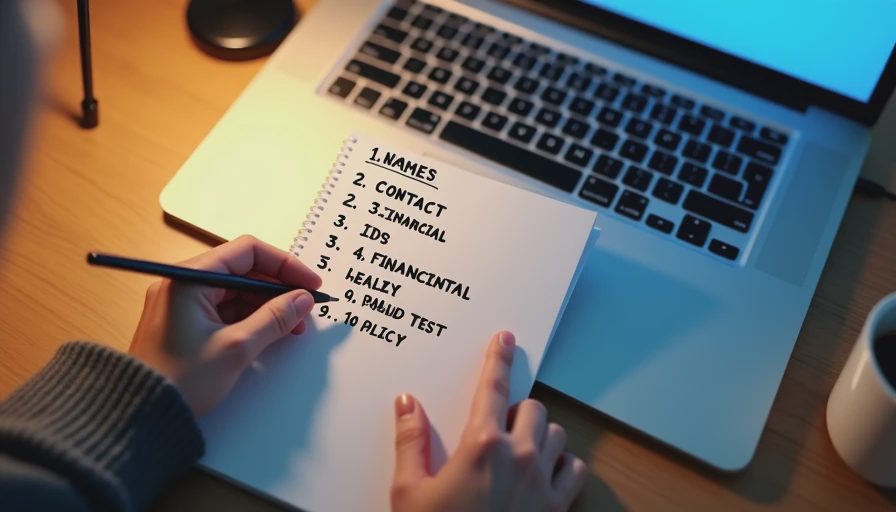
Here's the checklist I wish I'd had.
Before pasting anything into an AI tool:
1. Check for names. Client names. Employee names. Customer names. Vendor names. Replace with placeholders like [CLIENT], [EMPLOYEE], [VENDOR].
2. Check for contact information. Email addresses. Phone numbers. Physical addresses. Replace with [EMAIL], [PHONE], [ADDRESS].
3. Check for identifiers. Account numbers. Project codes. Contract numbers. Order numbers. Replace with [ID].
4. Check for financial data. Prices. Budgets. Salaries. Bank details. Remove entirely. Don't paste.
5. Check for health or personnel data. Medical information. Performance reviews. Disciplinary notes. Remove entirely. Don't paste.
6. Check for legal data. Contract terms. Dispute details. Settlement figures. Remove entirely. Don't paste.
7. Check for confidential business data. Strategy documents. Financial projections. Trade secrets. Remove entirely. Don't paste.
8. Check for anything you wouldn't want a stranger to read. If the answer is no, remove it.
9. Use a paid tier for confidential work. If the work involves any personal or confidential data, use a tool with clear privacy controls. Free tiers often don't offer that.
10. Read the tool's data policy before pasting. Every tool is different. Know what happens to your data before you paste.
The rule I now follow: If it contains personal data, don't paste it. If I need AI help, I redact the document first and paste only what's necessary.
What I'm Asking the Community
What should the cleanup checklist say?
I've shared my ten-item checklist above. But I think it's missing something.
Here's what I'm asking:
1. What did I miss on my checklist? Are there categories of personal data I haven't considered?
2. What should the redaction process look like? Do you manually redact, or do you use a tool? Do you use a placeholder system? Do you have a standard?
3. What should I do if I've already pasted something? I deleted the conversation. I checked the policy. Is there anything else I should do? Should I notify the client? Should I document it somewhere?
4. How do I prevent this in the future? I have a checklist. But checklists fail when you're in a hurry. Is there a better system?
5. Should this forum have a specific tag for privacy incidents? I see privacy mentioned in the plan, but I haven't seen many posts about it. Maybe we need a dedicated tag or a pinned checklist.
6. Should I tell the client? This is the question I'm most uncertain about. The document was already shared with me legitimately. The paste was a mistake. No harm came of it. But the client might want to know. What would you do?
7. What about free tiers? The free tier is what I used. Are free tiers ever appropriate for client work? Or should they only be used for non-confidential tasks?
I'd also like to know if there's a standard for this. Do libraries, law firms, or healthcare organizations have specific rules for AI tools? If so, what are they?
And one more question: is there a way to test my own habits? Something like a surprise audit—a document I didn't know had personal data—to see if I catch it before pasting?
If you've made this mistake, please share your experience. If you have a checklist that works, please share it. I'd rather build a better habit now than after a real breach.
A Few More Details
I should mention: I've anonymized all names, places, and details. The pattern matters, not the specific content.
I should also mention: I didn't notify the client. The risk was low, and the deletion was fast. But I'm not sure that was the right call. I'd like to hear what others think.
If you have a standard cleanup checklist, please share it. If you've built a habit that prevents this, I'd like to hear about it. I'm trying to turn this mistake into a better process.
Comments
No comments yet — be the first to share a thought.